TL;DR
- The steps to create a Google Business Profile are easy and take about 20 minutes if you have your business information ready.
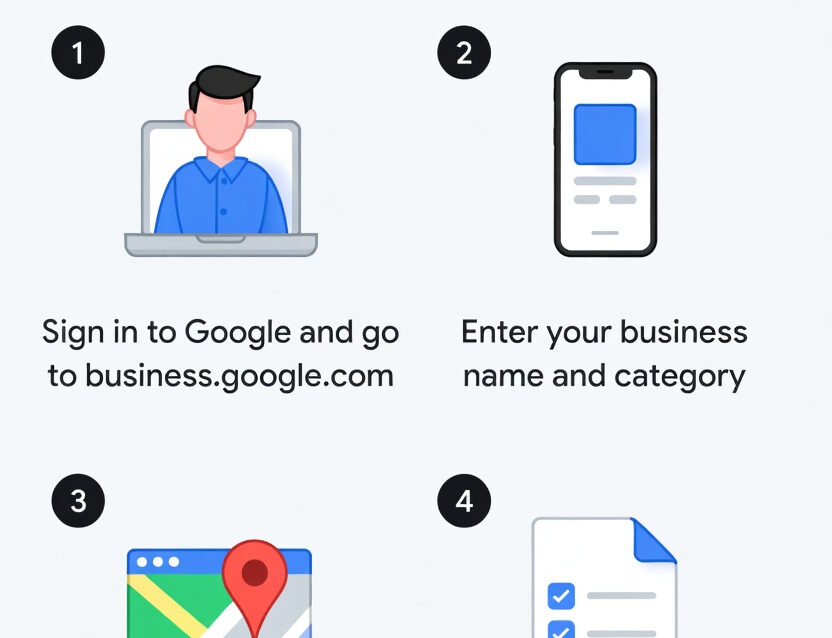
- Go to google.com/business, sign in with a Google account, and follow the prompts to add your business name, category, location, and contact info.
- Verification is required before your profile goes fully live. Options include postcard, phone, email, video, or Search Console verification.
- Choosing the right primary category is one of the biggest ranking factors for showing up in local search results.
- A half-finished profile is almost worse than no profile at all. Complete every section, add real photos, and keep it updated.
If your business does not show up when someone searches for what you do in your area, you have a visibility problem. And the fastest way to fix it is to create a Google Business Profile.
This is the free listing that appears when someone Googles a local business. It shows up in Google Maps. It shows up in the local 3-pack (those three business listings near the top of the search results that get a disproportionate amount of clicks). And for a lot of businesses, especially service-based ones, it is the single most important piece of digital real estate they own.
The good news is that setting one up is straightforward. The bad news is that most people rush through the setup, skip important fields, and then wonder why their profile is not generating any calls or foot traffic.
Let’s walk through the whole thing the right way.
Before You Start: What You Need To Create A Google Business Profile
Before you sit down to create your profile, gather these things so you are not scrambling mid-setup:
Your exact legal business name (as it appears on signage, your website, and other listings). Your physical business address (if customers visit you) or your service area (if you go to customers). A local phone number. Your website URL. Your business hours. A Google account (Gmail works, or you can create a Google account with any existing email).
One thing that matters more than most people realize: consistency. Your business name, address, and phone number (what SEO folks call “NAP”) need to match across your website, your social media profiles, your directory listings, and your Google Business Profile. Inconsistencies confuse Google and can hurt your local search rankings.
Step 1: Go to Google Business Profile Manager
Head to google.com/business and click “Manage now.” Sign in to your Google account, or create one if you do not have one yet.
Quick tip: Use a Google account that belongs to the business, not your personal Gmail. If you ever need to hand off profile management to an employee or a marketing partner like a fractional CMO, having it tied to a shared business account makes life much easier.
Step 2: Enter Your Business Name
Type in your business name exactly as it appears in the real world. Google’s autocomplete will suggest existing listings. If your business already has a listing (someone may have created one, or Google may have auto-generated it from public data), you will see it pop up. In that case, claim it instead of creating a duplicate.
If your business does not appear, click “Add your business to Google” and keep going.
Important: Do not stuff keywords into your business name. “Mike’s Plumbing” is correct. “Mike’s Plumbing – Best Emergency Plumber in Dallas TX 24/7” is a violation of Google’s guidelines. Google suspends profiles for this, and getting reinstated is a headache you do not want.
Step 3: Choose Your Business Type
Google will ask how customers interact with your business. You will see options like:
- Local store: Customers come to you (restaurant, retail shop, law office).
- Service business: You go to customers (plumber, electrician, mobile groomer).
- Online retail: Customers buy from your website.
You can select more than one if they apply. A law firm with a physical office that also does consultations by phone would typically select “local store.” A contractor who has a shop but also visits job sites might select both.
This choice matters because it determines whether Google shows your address publicly or just your service area.
Step 4: Pick Your Primary Category
This is one of the most important decisions in the entire setup process. Your primary category directly influences which searches your profile appears in.
Google offers over 4,000 business categories. Be as specific as possible. “Personal Injury Attorney” is better than “Lawyer.” “Pediatric Dentist” is better than “Dentist.” “Thai Restaurant” is better than “Restaurant.”
You can add secondary categories later, and you should. But the primary category carries the most weight for local rankings. Take a few minutes to search through the options and find the closest match for your core business.
Step 5: Add Your Location or Service Area
If customers visit your physical location, enter your full street address. Google may show you similar listings to make sure you are not creating a duplicate. If none of them are you, keep going.
If you are a service-area business (you travel to customers and do not have a storefront), you can hide your address and instead define your service area by city, county, zip code, or a radius around your location.
Some businesses need both. A restaurant has a physical location, but they also deliver. A law firm has an office, but they also make house calls for estate planning clients. Set it up to match how your business actually operates.
Step 6: Add Your Contact Information
Enter your business phone number and your website URL.
Use a local phone number if you have one. Google tends to favor local numbers over toll-free numbers for local search results. And if you are running any kind of marketing campaigns, this is where call tracking becomes important. You want to know which marketing channels are driving calls to your business, and that starts with how your phone numbers are set up.
If you do not have a website yet, you can skip the URL field. But you should get a website built as soon as possible. If you are going to create a Google Business Profile without a linked website, you are leaving a lot on the table when it comes to local SEO performance. Just get a simple website up even if it’s not perfect.
Step 7: Verify Your Business
Google needs to confirm that you are a real business at a real location before your profile goes fully live. Verification options vary depending on your business type and history, but common methods include:
Postcard by mail: Google sends a postcard with a verification code to your business address. This takes 5 to 14 days. Do not change your business name or address while you are waiting for the postcard, because it can reset the process.
Phone or SMS: For some businesses, Google offers instant verification via a code sent to your phone number.
Email: Google sends a code to your business email.
Video recording: You record a short video showing your business location, signage, and proof of operations.
Live video call: You do a live video call with a Google support representative and show your business location and signage.
Google Search Console: If you have already verified your website in Google Search Console, instant verification may be available.
Complete verification as soon as you can. Unverified profiles have limited features and lower visibility. As of late 2024, a verified profile is also required if you want to run Google Local Services Ads.
Step 8: Complete Every Section of Your Profile
This is where most people drop the ball. They verify the listing and then never come back to fill in the details. A half-finished profile tells Google (and your potential customers) that you are either not paying attention or not particularly serious about your business.
Here is what to fill out:
Business description:
You get 750 characters. Use them. Include your city, your core services, and what sets you apart. Write it in plain language, not marketing jargon. Think of it as your elevator pitch for someone who has never heard of you.
Services:
Google lets you list your specific services. Be thorough. If you are a law firm, list every practice area. If you are a plumber, list every service you offer. This helps Google match your profile to more specific searches.
Business hours:
Straightforward, but keep them accurate. Update them for holidays. Nothing frustrates a potential customer more than driving to a business that Google says is open, only to find a locked door.
Attributes:
Google offers various attributes depending on your category. Things like “wheelchair accessible,” “free Wi-Fi,” “veteran-owned,” “women-owned,” and others. Select everything that applies. These show up on your profile and can influence which searches you appear in.
Products:
If applicable, add your products with descriptions and pricing.
Step 9: Add Real Photos
Profiles with photos get significantly more clicks and engagement than profiles without them. And we are talking about real photos, not stock images. Google wants to see actual representations of your business.
Upload high-quality images of your storefront or office, your interior, your team, your products or work in progress, and anything else that gives people a feel for what to expect. Photos should be 720p resolution or higher.
Short videos work here too. A 30-second walkthrough of your office or a quick clip of your team in action can build trust before someone ever picks up the phone.
Step 10: Start Collecting Reviews
Reviews are one of the biggest ranking factors for Google Business Profiles, and they are also one of the biggest trust signals for potential customers. A business with 50 reviews and a 4.8 average will almost always outperform a business with 5 reviews and a perfect 5.0.
The key is to build a system for asking. After you complete a job or close a case or finish a meal, ask satisfied customers to leave a review. Make it easy by sharing a direct link to your review page. Google provides this link inside your profile dashboard.
And respond to every review. Thank people for positive feedback. Address negative reviews professionally and constructively. Google has confirmed that responding to reviews signals that your business is active and engaged, which can improve your ranking.
What to Do After Your Profile Is Live
Setting up the profile is step one. Keeping it active and optimized is the ongoing work that separates businesses that get calls from businesses that get ignored.
Post regularly.
Google Business Profiles have a built-in posting feature. Share updates, offers, events, or tips at least once a week. Google favors active profiles.
Monitor your insights.
Google provides data on how people are finding your profile, what searches they used, how many people called you directly from the listing, and more. Use this data to understand what is working.
Keep your info updated.
Changed your hours? Added a new service? Moved to a new location? Update your profile immediately. Outdated information erodes trust and hurts rankings.
Watch for suggested edits.
Google (and the general public) can suggest edits to your profile. Check for these regularly and reject anything inaccurate.
Common Mistakes to Avoid
Using a P.O. Box or virtual office.
Google requires a real physical address. Virtual offices and mailbox services are against the guidelines and can get your profile suspended.
Creating duplicate listings.
If your business already has a listing (even one you did not create), claim it instead of making a new one. Duplicates confuse Google and split your review history.
Ignoring the profile after setup.
A stale profile with no posts, no new photos, and no recent reviews sends a signal that your business might not be active. Stay on top of it.
Choosing a broad category.
“Consultant” tells Google almost nothing. “Marketing Consultant” is better. “Digital Marketing Consultant” is best. Specificity wins.
Not linking your profile to a broader local SEO strategy.
Your Google Business Profile does not exist in a vacuum. It works best when it is part of a complete local SEO approach that includes an optimized website, consistent directory listings, and content targeting local search terms. If you are a law firm, we wrote about this dynamic in depth in our posts on law firm marketing in Chicago and Philadelphia law firm marketing, where Google Business Profile optimization is a critical piece of the competitive puzzle.
Does Your Business Type Matter?
Absolutely. While the setup process is the same for everyone, how you create a Google Business Profile and optimize your details depends on what kind of business you run.
Service-area businesses (plumbers, electricians, landscapers, mobile services) should hide their physical address and instead define a service area. You will still rank in local results, but Google will not display your home address to the public.
Multi-location businesses need a separate profile for each location. Each one should have its own phone number, address, and location-specific content.
Professional services firms (law firms, accountants, consultants) should pay close attention to the services section and use it to list every practice area or service offering. For professional services companies in the $2M to $20M revenue range, a well-optimized Google Business Profile paired with the right marketing tools can be a serious lead generator. We put together a comprehensive breakdown of the best marketing tools for law firms that covers the full stack, from call tracking to CRM to content optimization.
Home services businesses benefit from adding photos of completed work. Before-and-after shots of a kitchen remodel, a clean junk removal job, or a freshly landscaped yard can be the difference between getting a call and getting scrolled past.
Final Thoughts On How To Create A Google Business Profile
Taking a few minutes to create a Google Business Profile is free, and it is one of the highest-impact things you can do for your local visibility. But “creating” the profile is just the beginning. The businesses that actually win in local search are the ones that treat their profile like a living, breathing part of their marketing strategy.
Complete every field. Add real photos. Collect reviews consistently. Post updates weekly. Monitor your insights. And make sure your profile is connected to a larger marketing strategy that includes your website, your content, and your call tracking infrastructure.
If you are not sure where your Google Business Profile fits into your overall marketing plan, or if you need help getting it set up and optimized the right way, reach out to our team. We help businesses get found, get calls, and get results.

Ethan Priest is a cofounder of Foxtown Marketing and the creative force behind everything visual. From digital ads and video to full brand refreshes, Ethan makes sure every piece of content looks sharp and fits the bigger marketing picture.
But Ethan’s not just a designer. He brings serious analytical chops to the table, with deep expertise in SEO, PPC, website optimization, and the data that ties it all together. He’s the guy who can build you a beautiful landing page and then tell you exactly why it’s converting (or not).
More recently, Ethan has become one of the team’s go-to specialists in AI marketing and Generative Engine Optimization (GEO), helping clients show up not just in traditional search results but in AI-generated answers and recommendations. As the way people find businesses continues to shift, Ethan is already ahead of the curve, making sure Foxtown’s clients don’t get left behind.
His background spans graphic design, motion graphics, and multimedia production, and he’s known for turning complex ideas into visuals that actually land. He works closely with the entire Foxtown team to make sure every project hits the mark and looks great doing it.
While many dream of being digital nomads, Ethan proudly calls himself a “digital slow-mad,” taking his time as he explores the world one country (and coffee shop) at a time, currently based in Lisbon. When he needs to recharge, you’ll find him nose-deep in a fantasy novel, chasing mountain trails with his camera, hunting for local art scenes, or experimenting with new animation techniques just for the fun of it.
Ethan lives by the belief that creativity isn’t just a job. It’s a way of life, and every adventure feeds the next project.