The short version
- Attribution models are rules for splitting credit for a sale across the ads, searches, and visits that came before it.
- Most businesses under about $5M in revenue get more value from clean call and form tracking than from complex modeling.
- GA4 now offers data-driven attribution as the default, plus last click, and dropped the older rule-based models in 2023.
- No attribution model sees everything, so pair it with simple checks like asking customers how they heard about you.
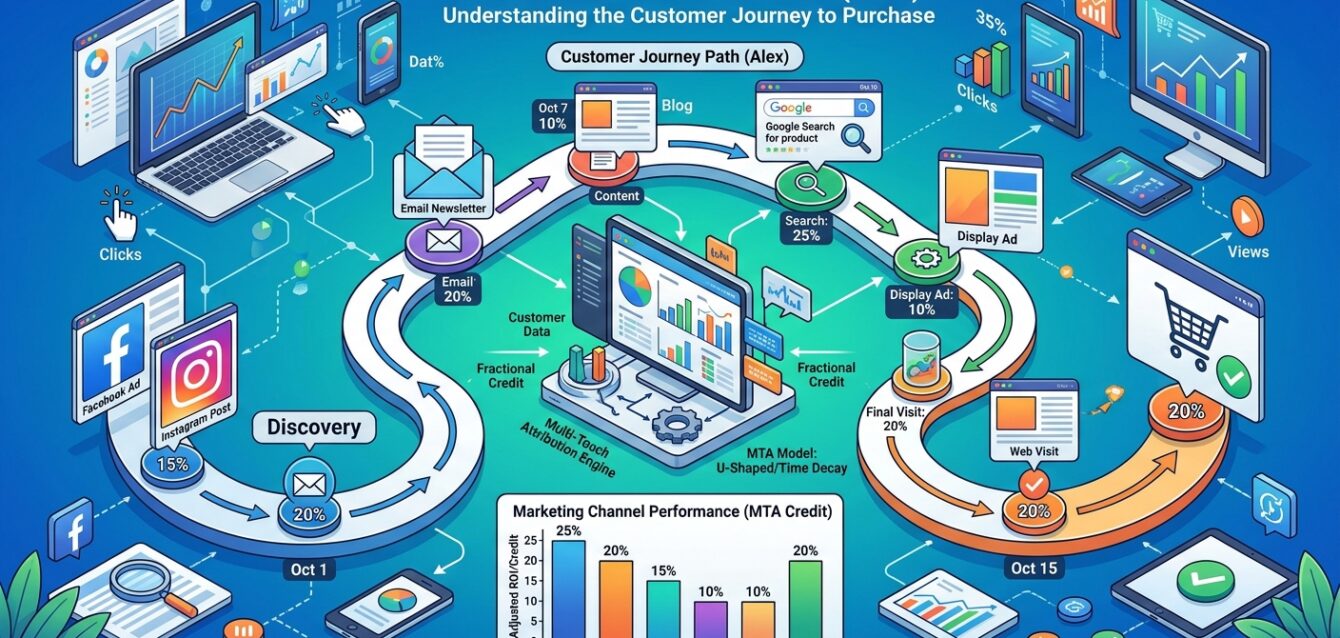
Multi touch attribution is a way of giving credit for a sale to more than one marketing touch. A customer might see a Facebook ad, search your name on Google a week later, read two blog posts, then call from a Google Ads click. Last-click reporting hands all the credit to that final ad. A multi-touch model spreads the credit around so you can see which channels help earlier in the process.
That sounds like something every business should want. In practice, it’s useful for some and a distraction for others. Here’s how the models work, what GA4 does on its own, and how to decide whether it’s worth your time.
The attribution models, in plain English
Every model is just a rule for splitting credit. Here are the common ones, using the example above with four touches before the sale.
| Model | How it splits credit | What it favors |
|---|---|---|
| Last click | 100% to the final touch | Bottom-of-funnel ads and branded search |
| First click | 100% to the first touch | Whatever introduced the customer |
| Linear | Equal shares to every touch | Nothing in particular, which is the point |
| Time decay | More credit to touches closer to the sale | Recent activity |
| Position-based | Usually 40% first, 40% last, 20% split across the middle | The introduction and the close |
| Data-driven | Uses your account’s own data to estimate each touch’s effect | Whatever the data says actually changes outcomes |
The first five are rule-based. Someone picks the rule, and the software applies it. Data-driven attribution compares paths that led to a conversion with paths that didn’t, then estimates how much each touch moved the odds. It’s the only model that adapts to your business, but it’s also a black box. You can’t see exactly why it gave a channel the credit it did.
How GA4 handles multi touch attribution
Google Analytics 4 uses data-driven attribution as its default reporting model. In 2023, Google removed first click, linear, time decay, and position-based from GA4 and Google Ads, leaving data-driven and last click as the main choices. So if you read an older guide telling you to compare linear and time decay in GA4, those options are gone.
A few things to know about GA4’s version:
- It only sees what GA4 tracks. Phone calls, in-store visits, and offline sales don’t show up unless you send them in.
- It works best with plenty of conversions. With a handful of leads a month, the model has little to learn from.
- Cookie consent, ad blockers, and cross-device behavior all leave gaps in the paths it sees.
- The model comparison report lets you see how credit shifts between data-driven and last click, which is a useful sanity check.
- Google Ads has its own attribution settings, and its conversion numbers will not match GA4 exactly.
That last point trips people up constantly. Different tools count differently. Pick one source of truth for each decision and stop trying to make every dashboard agree.
When small businesses should bother
This kind of modeling earns its keep when three things are true. You spend real money on several channels at once, your customers take more than one visit to decide, and you have enough conversions for patterns to show up.
Signs you’re ready:
- You spend $10,000 or more a month across three or more paid channels.
- Your sales cycle runs weeks or months, as with B2B software, solar, high-end remodeling, or financial advice.
- You’re getting dozens of leads a week, not dozens a month.
- You already track calls and forms well, and you can tie leads to revenue in a CRM like HubSpot.
B2B and SaaS companies with long cycles usually get the most out of it. Upper-funnel spend on LinkedIn or YouTube looks useless under last click, and multi touch reporting shows whether it’s feeding the pipeline.
When you shouldn’t bother
For a lot of local service businesses, this kind of modeling is a solution looking for a problem. If you’re a plumbing company where 80% of leads are phone calls from people who searched once and called within ten minutes, the path is short. Last click is close enough. Your time is better spent making sure every call gets answered and every lead gets followed up, since a missed call costs more than any attribution error. Once you add channels that work slowly, like SEO content, YouTube, or sponsorships, the question becomes worth asking again.
Skip it, or at least put it off, if:
- You’re not yet tracking phone calls with a tool like CallRail or WhatConverts.
- Your leads aren’t connected to booked jobs or revenue anywhere.
- You get fewer than 50 conversions a month.
- You run one or two channels and already know which one works.
- Nobody on your team will change budgets based on the report.
The last one matters most. Attribution is only worth doing if it changes where you spend money. A pretty report nobody acts on is a vanity metric with extra steps.
A practical setup that works for most companies
Here’s the order we usually build things in, from most to least important:
- Track every phone call and form fill with source data.
- Connect those leads to your CRM or field software so each lead carries a revenue number.
- Send booked jobs or closed deals back to Google Ads and Meta as offline conversions.
- Use GA4’s data-driven model and the model comparison report to see which channels assist.
- Add a “How did you hear about us?” question to your forms and intake script.
- Build a simple dashboard in Looker Studio that shows spend, leads, and revenue by channel.
The self-reported question catches things software can’t see: podcasts, word of mouth, a truck wrap, a billboard. It’s messy data, but when it disagrees with your attribution model, that disagreement is worth looking into. Our guide to marketing attribution covers the bigger picture, and our marketing KPI dashboard post shows what to put on that dashboard.
FAQ
What is multi touch attribution?
It’s a way of splitting credit for a conversion across several marketing touches instead of giving it all to the first or last one.
What is the best attribution model?
For most businesses with enough data, data-driven is the best default. For small accounts with few conversions, last click plus good call tracking is often more reliable.
Does GA4 still have linear attribution?
No. Google removed linear, first click, time decay, and position-based models from GA4 in 2023. Data-driven and last click remain.
Is multi touch attribution accurate?
It’s an estimate. Tracking gaps from privacy settings, devices, and offline sales mean no model sees the full path.
If you want help setting up tracking that ties your marketing to revenue, take a look at our marketing analytics and attribution service or reach out and we’ll talk through where your data stands.

This is the Foxy account shared by our leadership team, Ethan, Jonathan and Helen. Our writing is inspired by situations we encounter (or would like to encounter) with our clients. We aim to post new articles about AI, SEO, PPC, marketing automation and all the other related topics that appear in our day-to-day marketing lives.